Friday, March 8, 2013

High number of LATCH_EX waits

During an implementation of a new SQL environment for a customer I went into some problem with high nr of waits of LATCH_EX type when they run some heavy batches. I was not sure what this really was. I quite familiar with PAGELATCH and so on. Those are much more common, at least in server I have seen.
The customer asked me to investigate what the problem was. First I read the whitepaper “Diagnosing and Resolving Latch Contention on SQL Server” from Microsoft.
There were some ideas coming up after that. The server did have many CPU cores, 32 to be exact. The database had only one datafile.
First I tried to add more files to the database. I tried to use 4 but there was no big change. I went down from 32 ms in average to 27ms. After investigate sys.dm_os_latch_stats is was quite obvious what the problem was. ACCESS_METHODS_DATASET_PARENT was huge.


Regarding BOL it means Used to synchronize child dataset access to the parent dataset during parallel operations.

I did some try to set the Max Degree of Parallelism from default 0 to 4 or 8. This change had the desired effect. In the graf below we can see the effect very clearly on the black line. We see the batch starts, then a change to 8 for the Max Degree of Parallelism. Then I change it back, and then to 4 and then to 8.


Monday, February 4, 2013

Play around with new windowing functions


Im not an developer but off courseI like to try new features and get knowledge in the transact language anyway. I have been interested in stocks for many years and was playing around with Excel to do some simple classic stock analysis. Then it come to my mind if these calculations is possible direct in SQL.
Here was a must try scenario to learn some more transact. In my example I have a simple table with date, high, low, close columns. The data is from OMX30 index beginning from year 2005 to now.

In the first case I would like to calculate Moving average for a period of 200 days. One of the most simple analysis in stock analysis are when the price pass over 200 days moving average there is a buy situation. When going down under this value you shall sell. If its tru or not I don’t know. But it’s a good indication if the market is positive or negative.
How can we use the new windowing function in transact then? Here is an example:

SELECT id, stock, date, close
,AVG(close) OVER (PARTITION BY stock ORDER BY date ROWS BETWEEN 199 PRECEDING AND CURRENT ROW) as  '200 SMA'

Really simple. Actually I don’t even know how to do when you don´t have this grate functions. Here is the result.

Stock         Date         Close        200 SMA
omx30     2013-01-28 1160.25 1057.748500

I will investigate those function more and try use them for more advanced calculations. That would be another post.

Wednesday, November 14, 2012

How to switch cluster nodes in Windows 2003 with SQL 2005 installed


This is not the most modern products anymore. Anyway I went in to a problem where we were forced to switch the old server to new one.
If some of you out there need to do it I describe the steps here. Not in detail but some aspect to think about.


  • Add the new servers to the cluster, so in our case we had now a 4 node cluster. Be sure that the disks also are shred to the new server.
  • Expand the SQL installation to the new servers. This is done from the first cluster node. In add remove program you change the SQL installation. Chose the correct instance and add the new server. One important thing when doing this is to NOT be logged on with the same account that you install with on the new servers. The Remote execution will fail if you do. When the installation is success SQL is now installed on the new servers.
  • Install same SQL servicepack and patches as the old servers. Run also those from the active cluster node.
  • If you need any SQL client tool on the new nodes you have to install this one by on respective server and also the servicepack and patches for those.


If everything went well it’s now some issues to take care of :-)

Certificates
If you have used a certificate in SQL be sure this is installed on the new servers. If not the engine would not start. You receive an error like: Unable to load user-specified certificate. The server will not accept a connection. You should verify that the certificate is correctly installed. See "Configuring Certificate for Use by SSL" in Books Online.
In our case there was some old ssl certificate added that was not even in use anymore. I tried to remove the string in register HKEY_LOCAL_MACHINE\SOFTWARE\Microsoft\Microsoft SQL Server\MSSQL.1\MSSQLServer\SuperSocketNetLib\Certificate but that was not so straight forward as I thought. When failing over the resource it added back the old certificate key anyway. After some testing I recognized that it has to be done on the active nodes in the cluster before you move the resources. In our case the certificate was not used so I just leaved the value blank.

MSDTC
I also had some issues with the transaction cordinator. It was impossible to start it on the new servers.  In the windows log I got some errors like MS DTC has detected that a DC Promotion has happened since the last time the MS DTC service was started and MS DTC Transaction Manager start failed. LogInit returned error 0x8007000e. Our clusternodes was also domain controllers. And the new one had been added as new domain controllers as well (I know it’s not a nice solution). I found a KB on this http://support.microsoft.com/kb/900216. After change the register permission on for NETWORK SERVICES account it worked well.

Service account cant be verified
I you have a trailingspace in the clustergroups name where SQL reside you get a error says that the account you type for SQL service is wrong or can´t be verified. 
"SQL Server could not validate the service accounts. Either the service accounts have not been provided for all of the services being installed, or the specified username or password is incorrect." See http://support.microsoft.com/kb/955506 for more info.

Hope this can help someone :-)

Wednesday, September 19, 2012

SET SPN on the SQL service account

It´s not so easy to find a clear roule how this shall be done. But this is what I use and it works.
You have to setup three SPN-s, Full FQDN against the port (be sure to use static), FQDN against the instancename and a third one against the Netbios name.

SETSPN -s MSSQLSvc/SERVERNAME.DOMIANNAME.COM:port DOMAIN\SQLSERVICEACCOUNT
SETSPN -s MSSQLSvc/SERVERNAME.DOMIANNAME.COM:Instancename DOMAIN\SQLSERVICEACCOUNT
SETSPN -s MSSQLSvc/SERVERNAME DOMAIN\SQLSERVICEACCOUNT

For the analysis service those two are needed

SETSPN -s MSOLAPSvc.3/SERVERNAME.DOMIANNAME.COM:Instancename DOMAIN\SQLSERVICEACCOUNT
SETSPN -s MSOLAPSvc.3/SERVERNAME:Instancename DOMAIN\SQLSERVICEACCOUNT

In some situation also the browser needs to be fixed.

SETSPN -s MSOLAPDisco.3/SERVERNAME.DOMIANNAME.COM SERVERNAME
SETSPN -s MSOLAPDisco.3/SERVERNAME SERVERNAME

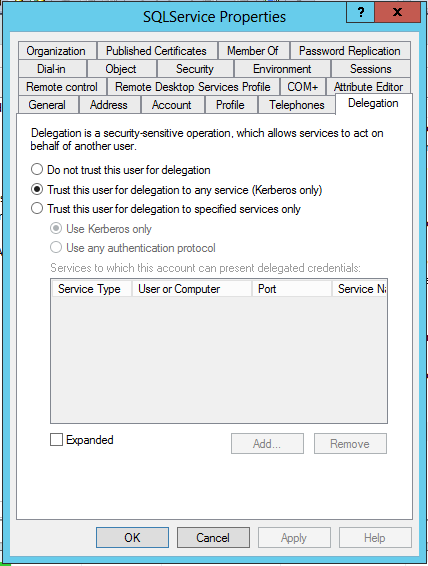
Beyond of the Kerberos SPN setting you also need to set the serviceaccount trusted for delegation in active directory. Client will use Kerberos anyway but in some situation
where you have more then two machines involved in the authentication chain this is necessary.


Monday, September 3, 2012

Query Excel and text files from SQL

Here is some different ways to query an excel sheet or textfile.

Excel..
SELECT * FROM OPENDATASOURCE('Microsoft.Jet.OLEDB.4.0',
'Data Source=G:\test.xls;Extended Properties=Excel 8.0')...[sheetname$]

SELECT * FROM OPENROWSET('Microsoft.Jet.OLEDB.4.0',
'Excel 8.0;Database=G:\test.xls', [sheetname$])

SELECT * into import FROM OPENROWSET('Microsoft.Jet.OLEDB.4.0',
'Excel 8.0;Database=G:\test.xls', 'SELECT * FROM [sheetname$]')

Texfile..
select * from OpenRowset('MSDASQL',
'Driver={Microsoft Text Driver (*.txt; *.csv)}; DefaultDir=C:\Temp;Extended properties=''ColNameHeader=True;Format=CSVDelimited;''','select * from test.csv')

SELECT a.* FROM OPENROWSET( BULK 'c:\test\test.txt',
FORMATFILE = 'c:\test\formatfil.fmt') AS a;

Most of the time I have test to query textfiles from OPENROWSET it is difficult to delimiter the columns in the text file. I have never seen the Format=CSVDelimited settings having any affect. But the grate site connectionstring.com pointed out that you must set this in the registry on the server. And this works well for me. See example below. I wonder why the setting is available in the Extended Properties then?? At least I have never got it to work. But that says nothing :-)


The delimiter can be specified in the registry at the following location:

HKEY_LOCAL_MACHINE \ SOFTWARE \ Microsoft \ Jet \ 4.0 \ Engines \ Text 
"Format" = "TabDelimited" or "Format" = "Delimited(;)"